Thursday, December 30, 2010

RES User Workspace Management

In this video I explain the concept of User Workspace Management - the recipe for future success.


Please visit RES Software for additional information.

Happy New Year!

/Patrik

Wednesday, December 22, 2010

RES Software Zero Profile Technology - Demo

This is a short video demonstrating some of the capabilities of RES Software Zero Profile Technology.

Roaming profiles and folder redirection is not enough if you have a non-static and changing environment. Migrating profiles only move the problem.


http://www.youtube.com/watch?v=q93RtG4qEFc

/Patrik

Tuesday, December 21, 2010

IT as a Service through Dynamic Desktops

I have created a short video demonstrating the capabilities of RES Software Dynamic Desktop Studio to help IT deliver services through dynamic desktops.


/Patrik

Wednesday, December 1, 2010

Ease VDI adoption?

If you want to implement virtual desktops there are a few factors that I recommend you look into. I have listed three of them below that I think are important:

1. Choose your preferred desktop virtualization vendor.

2. Consider a technology agnostic profile management solution.

3. The move from physical to virtual desktops must be close to seamless from an end user perspective.

If you do the above, I believe the project will have greater success potential at lowest possible cost and highest user satisfaction.

How do I select virtual desktop technology?

If you leave out profile management and instead focus on who is best at delivering a virtual desktop, the choice becomes a bit easier. Look at what you already have in place in regards to virtualization technologies and decide to either stick with it (maybe due to competence) or consider another vendor if they provide business critical features as availability, security or performance. What we already know is that the virtualization area is rapidly evolving and new vendors appear providing new and better ways to virtualize your infrastructure. This rapid development makes it almost impossible to do a strategic choice on how to deliver the virtual desktop. You should be able to adapt to changes and use whatever technology is best and most cost effective at any time.

Profile management is a big problem but is not the only user challenge.

Desktop virtualization vendors often have their own way of dealing with profile issues. They usually are focused on their own technology and dependant on Windows roaming profiles to work. What you need is a solution that is technology agnostic meaning that you can choose whatever delivery mechanism for both the desktop and the application without having to manage everything in silo´s. But there are other things that need to be managed besides the user profile! How about login scripts or group policies? The management of these items is also silo based and challenging, especially in a dynamic virtual environments with frequent changes.
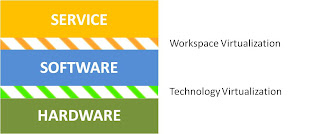
Virtualization
If IT is broken down and managed in these defined parts; hardware, software and service, separated by virtualization techniques, the dynamic enterprise are within reach! A bonus feature that comes with the technology is user based security. The context of the user logging on a desktop (virtual, streamed or physical) will decide how security is handled.

A seamless move from physical to virtual desktops.

This might sound like nirvana, but is actually achievable if the service layer is virtualized. This technique breaks down the complex desktop into simpler pieces that can be managed without dependencies and complex scripting.

To get there you need to gather existing configuration about what your users currently are receiving as services. By services I refer to what is exposed to the users on their desktop. It is important to gather information such as where the users are physically located, what applications they are using, printers and drives being mapped and last but not least - settings stored in their existing profile.

With this collected, managed and 'virtualized', IT is free to change the way services are delivered to the user; physical to virtual, XP to Windows 7 or fat to thin, anytime, back and forth and as often as needed.

Make a small step towards a big goal with workspace virtualization.

Thursday, September 23, 2010

The road to Self Service goes via Automation

Many companies strive to implement Self Service (service orchestration) in order to streamline IT and give a better service to the end-users. This way the IT services can be delivered consistent, secure and automatic. The I and T of IT is put back in order. Information is the responsibility of the organisation and the IT department is responsible for the Technology.

In order to be able to implement any kind of self service system, there has to be task automation in place. Daily routine tasks such as adding an Active Directory account, creating an Exchange mailbox, changing a phone number or installing an application must be automated and delegated back to the organisation. Without automation, no self-service!

The basic concept of a self service solution consists of three elements:

1. Qualification
2. Delivery
3. Return

A user qualifies for a service based on categories such as an identification. There should also be restrictions and dependencies tied to any service. A user allowed to create purchase orders should not be able to approve them i.e. a restriction. In order to have a mailbox you have to have an user account i.e. a dependency.

When a user qualifies for a service the delivery of the service is initiated either automatically or triggered by the user.

And when the user no longer qualifies, the service is returned.

Delivery of a service might also involve manual tasks such as order a new laptop or purchase an additional application license or an approval process, showing a message or asking for input.

Service orchestration is very useful for self service but also for employee onboarding and offboarding. Other areas of use is employee role change, application decommissioning, self paced migration and requesting a service for someone else.

You get better control, lower TCO, increased security and more productive users.

So if you are thinking of self service - make sure you start with automating your daily IT tasks!

Monday, September 6, 2010

Zero Profile Technology

User Profiles in Microsoft Windows environments causes a lot of headaches. Why? In short, user profiles are device and OS dependent and grow large.

Zero Profile Technology from RES Software takes care of any profile problem by simply copying user specific settings out of the user profile.

The first time a user starts an application Zero Profile Technology will grab the current application settings, copy it outside of the profile, and subsequently only specific changes are managed.

By doing this, a user can move between any computer and OS (Windows of course) and all settings will be preserved. IT will have control of the profile size and content. No more silo management of policy's. Only happy users and drastically simplified management.

Look at this video from RES Software Support to get a glimpse on how it works:

http://www.youtube.com/watch?v=15ftj5SAU58

And here it is explained in more detail:

http://blog.ressoftware.com/index.php/2010/07/22/zero-profiling-explained/

Note that Zero Profile Technology is only a small, but very important, part of  RES PowerFuse capabilities.

/Patrik

Monday, August 23, 2010

Migrations to Windows 7 and Virtual Desktops in rapid growth!

Four out of ten are delivering migration projects on time and on budget 


A survey of close to 1000 IT professionals in the Nordics conducted by software company RES Software shows that eight out of ten businesses have decided to roll out Windows 7, and almost half will roll out virtual workspaces by the end of the year. Migrating user profiles is considered the biggest challenge.


The survey shows that almost eight out of ten companies are planning to migrate to Windows 7 (W7), with the same amount having purchased licenses already. 34 percent have already rolled it out, and almost four in ten indicate that they have a few selected users up and running the operating system. 65 percent do not have any tools or procedures to migrate back from W7 on challenges arise.

“According to IDC over half of all businesses will migrate to W7 at the end of the year. The big challenge is that user settings and preferences disappear unless procedures are in place. This leads to large additional charges," said Ole-Kristian Sivertsen at RES Software.


Eight out of ten believe analysis and design of the platform will take up to six months, with the remaining using more time. For application testing, 75 percent believe that this will also take the same amount – up to six months. 40 percent indicated that they will spend more than six months on the actual roll-out. Migrating user profiles, downtime and lost productivity, lack of knowledge of the user environment and potentially disgruntled users are the biggest concerns.

“To deliver the same desktop environment is a necessity for a migration. We want to make it easier, safer and cheaper to manage users' desktop environments. Migrations are not difficult if you have the right tools. The process should take place without the users being affected, "says Sivertsen.

50% have decided to roll out virtual workspaces from Citrix or VMware. 45 percent by the end of the year, another 20 percent set in 2011.

"This confirms what many people know. Virtual workspaces are one of the biggest growth rockets in the market. The results show that customers have realized the many advantages of the concept. It is positively surprising that so many say they should have it in place during the fall, " says Sivertsen.


Nordic findings
The survey was also conducted in the Swedish and Danish market. Number of respondents in these two markets were almost 300 in total. Although the answers to a large extent aligned, there are also some interesting differences:

  • The Swedes are on top in the decision to roll out W7 (85 percent)Four out of ten Danish companies have rolled out W7, compared with three out of ten Norwegian and Swedish
  • 50 percent of Norwegian companies have taken the decision to roll out virtual workspaces. In Sweden and Denmark four out of ten have made the decision
  • Four out of ten Danish companies have not decided when the deployment of virtual workspaces to happen (six out of ten will be in place by the end of next year s). Just over half of Swedish companies will have it in place by the end of 2011
  • Half of the Swedish migration projects are delivered on time and on budget. Similarly, Norway and Denmark were ten percent lower
  • The Danes set a higher degree of planning for emergency preparedness plans / tools for the transition back from W7 (rollback)
  • Norwegian companies will use the shortest time on analysis and design of W7, the Swedes the most
  • Danes calculated shortest time to application and functionality testing (55 percent in under three months)
  • Half of Danish enterprises will have deployed the W7 to all users within three months. The Swedes will take the best time, probably because they have many special adaptations and tailoring to the user environment
  • Danish and Norwegian companies believed that the migration of user profiles will provide them with as many challenges. The Swedes were most worried about downtime and lost productivity. Other special concerns across the region were: Many tedious manual processes, dissatisfied users, the migration at the expense of more strategic initiatives and whether users would have the same permissions, the rights and programs as they had before migration
  • When asked about their thoughts on migrations, most respondents emphasized strongly that it is mission critical. About 15 per cent in each country believed migrations are fun. Between ten and 20 percent thought it was a necessary evil

About the Survey 
The web-based survey was conducted from Nordic end-users in July 2010 with nearly a thousand answers. 676 people answered the survey in Norway. Seven out of ten worked in the private sector. More than half had more than 500 IT users in the business. Half were architects or IT consultants. 20 percent were IT or operations manager. In Sweden, 179 people answered the survey. Seven out of ten came from the private sector. 55 percent from businesses with fewer than 1,000 IT users. In Denmark, there was 111 responses. Eight out of ten from the private sector, and seven out of ten had fewer than a thousand users in the IT environment.

About RES Software
RES Software is the market leader in solutions for the management of Microsoft-based user groups. The company operates development in administration of physical and virtual client solutions, and supports all types of customers of all sizes to reduce costs associated with the operation and management of desktop environment. Customers get a better ability to manage complex client and user groups more easily, and simultaneously meet demands from users who need personal and dynamic desktop environment regardless of time and place. RES Software supports both physical and virtual desktop solutions, and our patented technology makes it easier to manage, automate and deliver secure, personalized and innovative user experiences. For more information, follow us on Twitter @ RES Software and visit our website: www.ressoftware.com